Appointments & online booking
Bookable time, with no double bookings
Appointment booking software for UK businesses that sell time: services with a length and a price, a diary for each person, and online booking that only offers times that are really free.
30-day free trial · No card required · Web app today, apps in pilot

- Web Abrir ahoraBeta
 Próximamente
 Próximamente
 Próximamente
A diary in a notebook cannot tell you that two people booked the same chair, or that your practitioner is on holiday. TradeYoke's Appointments module works out the free times for you and refuses a double booking of a person or a room, even when two people press Book at the same moment. It shares the diary, customers and invoices with the rest of TradeYoke, so a booking turns into a visit and then into an invoice without being typed twice.
What it does
Appointments & online booking in TradeYoke
Services with a length and a price
Set how long each service takes, its price, time before and after, extras, a colour, who can do it and the rooms it needs.
Each person's week
Weekly hours, including split and overnight spans, time off, and whether they take bookings. Add rooms and chairs too.
Free times from the engine
Book from the diary, a customer's record or New appointment: where (clinic, their home or a site visit), who is seen and for what, then a free time or a time of your own.
No double bookings
A double booking of a person or a room is refused when it is saved, even when two people press Book at once.
Online booking
Switch your website to Book a time: visitors pick a service, a person or anyone, a day and a real free time, held while they type their details.
Regular services
Turn on Repeat to book the same visit every few days, weeks or months, with every date checked for clashes before you save.
The real thing
As it looks today
A real screen from the product, not a mock-up. The same screen is on the phone app.
Más pantallas, tal como se ven hoy


The details
Also worth knowing
- Move, reassign, complete or cancelMove a visit with free times offered, hand it to someone free, mark it done, a no-show or cancelled with a reason, or reopen it.
- Bills the way you workA completed appointment bills through the invoice ledger, itemised per person and billed to whoever booked.
- On the Schedule board tooAppointments sit on the Schedule board as fixed-time items in the trade's colour, and can be dragged there.
- The customer is looked afterEach online booking arrives as a new customer record for you to merge with one you already have, so nobody can book onto someone else's record by knowing their email, and the customer gets a confirmation email with a calendar file and a text, in your own words.
- Not here yetCancellation policies and fees, and a waiting list, are separate, later pieces of work and are not part of the Appointments module today.
Míralo en acción
Lo que obtienes, en las pantallas reales
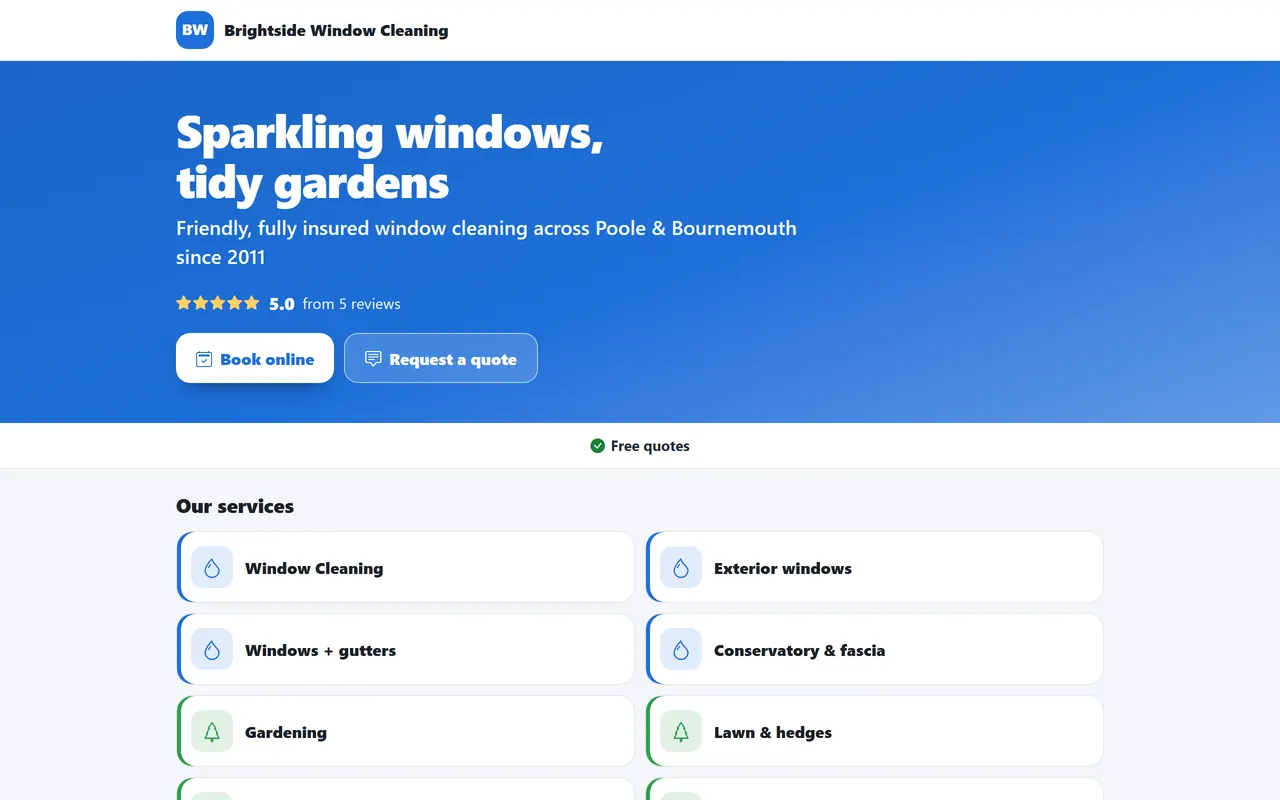
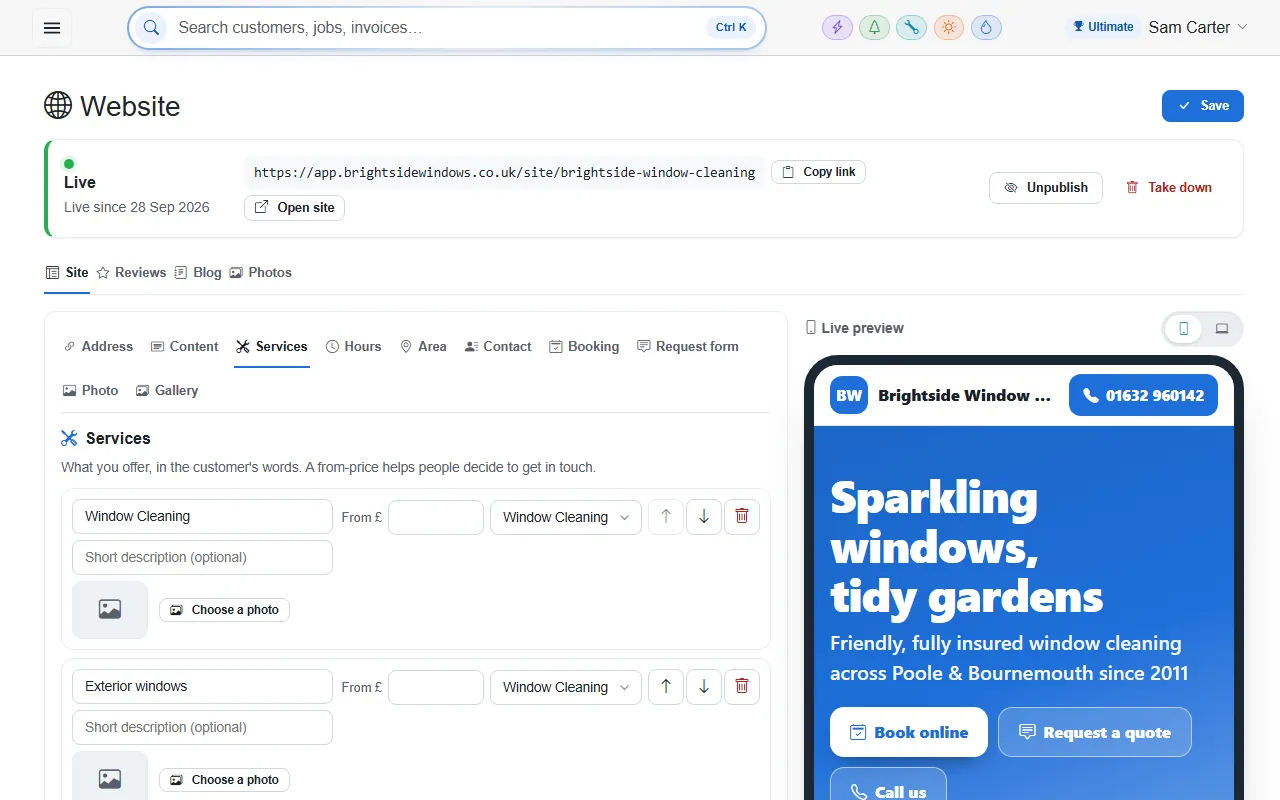
Página webUltimate · £29.99/mes
Tu propia página web, con reservas integradas
Un sitio profesional para tu negocio (tus servicios, fotos, reseñas y horario) donde los clientes pueden reservar o pedir un presupuesto, y cada consulta llega a TradeYoke como un cliente potencial.
- Reservas en línea: los clientes elegen un servicio, un día y un hueco
- Formularios de solicitar un presupuesto y que te llamen, con tus propias preguntas
- Cada consulta llega como un cliente potencial, lista para presupuestar
- Tus fotos, antes y después, reseñas y publicaciones de noticias
- Edita con una vista previa en directo para móvil y escritorio, y publica cuando estés conforme
Questions
Asked about appointments & online booking
Can customers book a time online?
Yes. From your own TradeYoke website a visitor picks a service, a person or anyone, a day and a real free time, and the time is held while they type their details. It lands in the diary as an online appointment. The website is part of the Ultimate plan; see the pricing page.
What stops two people booking the same time?
TradeYoke checks a person and a room when a booking is saved and refuses a double booking, even when two people press Book at the same moment. A time taken while someone was typing says "that time has just gone" and refreshes.
Can I make a visit repeat every few weeks?
Yes. Tick Repeat on the booking form, or press Make this regular on a visit, and choose every few days, weeks or months. Every date is checked for clashes before you save. Online booking never creates a regular service.
Can I see everyone's diary on one screen?
Yes. There is a day and a week diary for each person, and the same appointments sit on the Schedule board next to the rest of your work.
Try appointments & online booking on your own work
30 days of Essentials free, no card. Import your customers and see it against a real week.